
AI Image Prompt Writer:- Do you have an amazing story or script that you want to turn into a video or image series? We all know that the biggest hurdle in AI art generation is writing the perfect prompt.
To get high-quality results from tools like Midjourney, Leonardo AI, or Google Veo, you need to be an expert at “Prompt Engineering.” You need to know when to use technical terms like “Cinematic Lighting,” “Volumetric Fog,” or “Wide Angle.”
If you struggle with this, stop worrying. Today, we are reviewing NewAITool StoryBoard AI. This is currently the most advanced AI Image Prompt Writer available for free. You simply feed it your story (in English, Hindi, or other languages), and it automatically writes Hollywood-level, detailed technical prompts for you.
Let’s dive deep into why this is the best AI Image Prompt Writer for creators in 2025.
What is NewAITool StoryBoard AI?
NewAITool StoryBoard AI is a web-based tool powered by the Google Gemini 2.5 Flash model. While it functions as a storyboard creator, its core strength lies in being an intelligent AI Image Prompt Writer.
It reads your narrative, breaks it down into individual scenes, and writes a High-Quality Image Prompt for every single shot.
This AI Image Prompt Writer is designed for:
- YouTubers: Who need consistent visual storytelling.
- AI Artists: Who want to generate complex scenes without typing long descriptions manually.
- Filmmakers: Who need specific camera angles and lighting in their prompts.
Why is this the Best AI Image Prompt Writer?
Unlike basic tools, this AI Image Prompt Writer gives you full control over the output. Here are the standout features:
1. Intelligent Multilingual Prompt Writing
One of its strongest features is its ability to understand context. Whether you paste a story in Hindi or English, this AI Image Prompt Writer grasps the mood and converts it into precise, technical English prompts that image generators understand perfectly.
2. Global Style Settings (No More Guesswork)
A good AI Image Prompt Writer should know art styles. This tool offers 10+ Professional Presets:
- Realistic: “Cinematic Realistic,” “UE5 CGI” (Unreal Engine 5).
- Artistic: “Oil Painting,” “Watercolor,” “Noir.”
- Animation: “Anime Studio Ghibli,” “Pixar 3D,” “Cyberpunk.”
- Custom: You can also teach this AI Image Prompt Writer your own custom style.
3. Advanced Scene Segmentation
This tool doesn’t just write one prompt per paragraph.
- Deep Analysis: It detects every small event in your story.
- Max 15 Scenes: It can act as a granular AI Image Prompt Writer, generating up to 15 distinct prompts from a single paragraph.
4. Cinematic Camera Angles
To write a professional prompt, you need camera terminology. This tool automatically injects 25+ Camera Angles into your prompts:
- Wide Shots: Establishing Shot, Extreme Wide Shot, Bird’s eye view.
- Character Shots: Medium Close-Up, Over the Shoulder, POV Shot.
- Action: Dutch Angle, Dolly Zoom, Tracking Circle.
Step-by-Step: How to Use This AI Image Prompt Writer
Using this tool is incredibly simple. Here is the 4-step process:
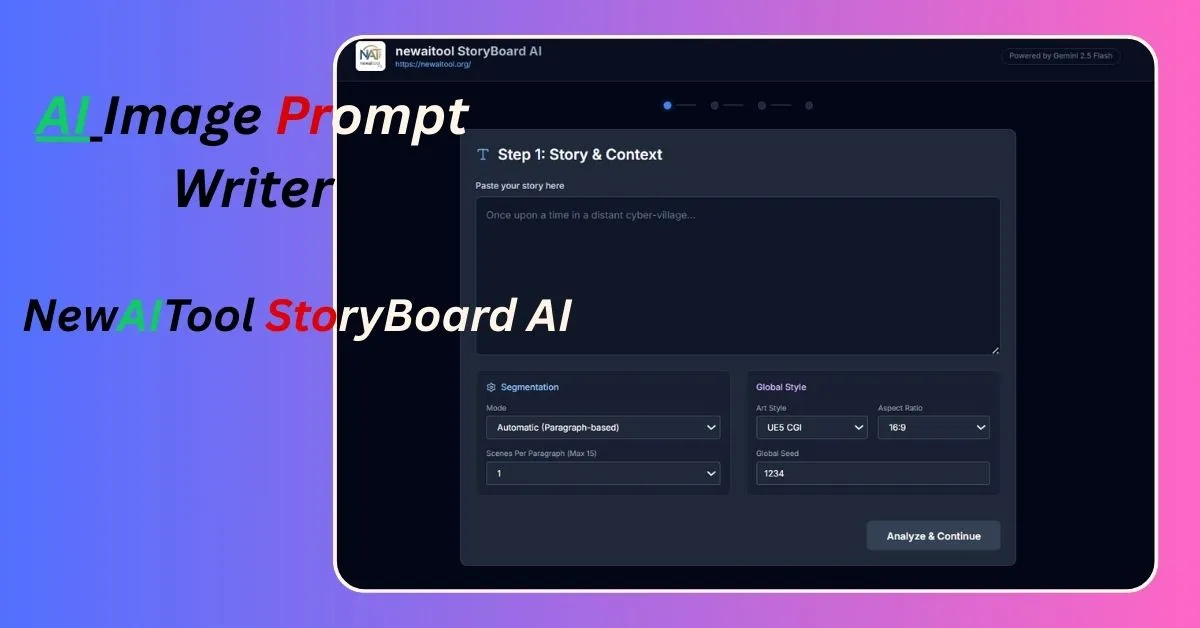
Step 1: Input Your Story
Go to the dashboard. Paste your script into the text box. Select your Art Style (e.g., UE5 CGI) and Aspect Ratio (16:9).
Step 2: Character Forge (Consistency)
Click ‘Analyze.’ The AI Image Prompt Writer will scan your story and detect characters.
- Crucial Feature: Use the Lock Button. This ensures the AI writes the exact same physical description for your characters in every prompt, solving the consistency issue.

Step 3: Select Scenes & Angles
Review the scenes. You can manually instruct the AI Image Prompt Writer to use specific angles (like “Low Angle” or “Drone Shot”) for specific moments.
Step 4: Generate & Export (The Magic Step)
Click “Generate.” As a comprehensive AI Image Prompt Writer, it provides three distinct outputs:
- Image Prompts: Text prompts ready for Midjourney or Stable Diffusion (includes tags like 8k, sharp focus, cinematic lighting).
- Animation Prompts: Motion-focused prompts optimized for Runway Gen-2 or Kling AI.
- Veo 3.1 JSON: It even writes code! It generates ready-to-use JSON files for Google’s Veo Video Model.
Finally, click “Download .txt” to save all your prompts.

Conclusion
If you are working in the AI creative space, NewAITool StoryBoard AI is a must-have. It eliminates the struggle of “Writer’s Block” for prompts.
Stop wasting time trying to guess the right words. Let the best AI Image Prompt Writer do the heavy lifting for you. Whether you need prompts for a YouTube video or a graphic novel, this tool delivers professional results instantly.
🚀 Ready to Generate Professional Prompts?
Turn your script into Midjourney & Veo visuals instantly. Try the best AI Image Prompt Writer now!
Try NewAITool StoryBoard AI ➤Read more:-
Google’s New Veo 3.1 is Here: Get Unlimited FREE Access on Higgsfield AI (Limited Time)
What is Google AI Studio? Creating with AI (No Coding Skills Needed!)
Did Google Launch Nano Banana AI? Find Out the Truth! Whose Tool Is It and How to Use It?