In this Opus Clip review, we look at why creating engaging short-form content is no longer an option; it is a necessity. However, editing long-form videos into viral shorts for YouTube, Instagram, and TikTok is incredibly time-consuming.
Enter Opus Clip.
Opus Clip is an AI-powered tool designed to solve this exact problem. It claims to turn one long video into ten viral clips in one click. But does it live up to the hype? In this review, we break down its features, compare it to competitors like Vizard and Vidyo.ai, and reveal a strategy to use Opus Clip unlimitedly for free.
What is Opus Clip?
Opus Clip is a generative AI video tool that repurposes long-form videos (like podcasts, interviews, or educational content) into professional short clips.
Unlike basic video cutters, Opus Clip doesn’t just slice video randomly. It uses AI to analyze your content, identify the most engaging “hooks,” and rearrange them into a cohesive viral short. It automatically adds captions, reframes the video for mobile (9:16 ratio), and assigns a “Virality Score” to help you decide which clip to post.
Key Features: Why Creators Are Switching to Opus Clip
Opus Clip offers a suite of features that sets it apart from standard video editors:
- AI Curation (Virality Score): The AI scans your video for funny moments, intense debates, or valuable insights. It then scores the clip’s potential to go viral.
- Active Speaker Detection: The AI keeps the speaker centered in the frame, even if they move around, ensuring your vertical video looks professional.
- AI Co-Pilot: This allows you to select specific timeframes or keywords to generate clips, giving you more control than purely automated tools.
- Auto-Emojis & Captions: It automatically generates dynamic captions with emojis, similar to the style used by top creators like Alex Hormozi.
- Multi-Platform Optimization: Whether you need content for Shorts, Reels, or Threads, the tool adjusts the resolution and format accordingly.
Opus Clip vs. Competitors: How Does It Stack Up?
Is Opus Clip better than Vizard, Klap, or Vidyo.ai? Here is a quick comparison:
| Feature | Opus Clip | Vizard | Klap | Vidyo.ai |
| Free Plan | 60 mins/month | 300 mins/month | Limited Trial | 75 mins/month |
| AI Intelligence | High (Virality Score) | Medium | Medium | Medium |
| Best For | Viral Growth | simple Cutting | Budget Users | Podcasters |
| Learning Curve | Low (Easiest) | Low | Low | Medium |
Verdict: While Vizard offers more free minutes, Opus Clip wins on quality. Its ability to predict viral content gives creators a strategic edge that other tools lack. built to address the shortcomings of its rivals—making it the best AI tool in this field, hands down.
How to Use Opus Clip: A Step-by-Step Guide
Using Opus Clip is straightforward. Follow these steps to generate your first batch of shorts:-
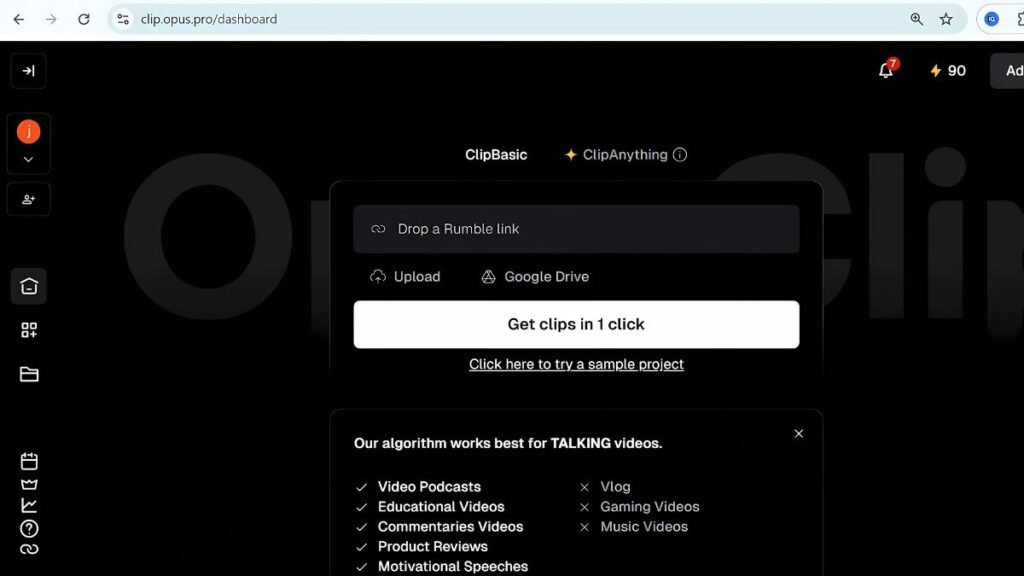
- Sign Up: Go to
Opus.proand create an account using Google or email. - Upload Source: Drop a video file or paste a YouTube link (e.g., a podcast episode).
- AI Processing: Wait a few minutes while the AI analyzes the footage.
- Review & Edit: Browse the generated clips. You can edit the text, change the brand colors, or adjust the start/end times manually.
- Export: Download your favorite clips in 1080p and share them to your social channels.
The “Unlimited” Strategy: How to Use Opus Clip for Free
Opus Clip’s free plan limits you to 60 minutes of upload time per month. If you are a broke creator or just testing the waters, you can extend your usage using the Temp Mail Method.
Note: The free version applies a watermark to your videos.
The Temp Mail Method:
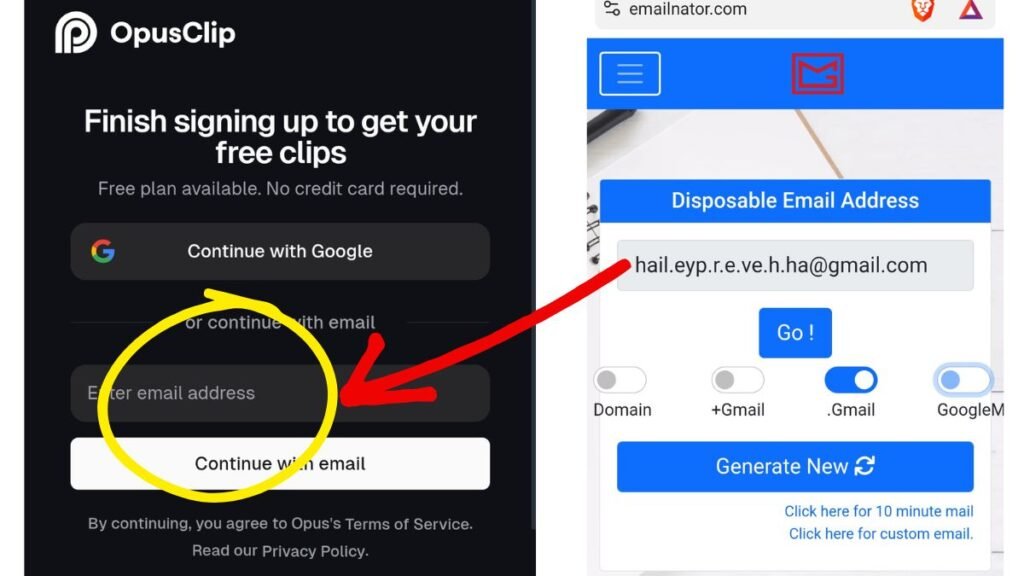
- Visit a Temp Mail Service: Go to sites like Temp-Mail.org or emailnator.
- Generate an Address: Copy the temporary email address provided.
- Register a New Account: Open Opus Clip in an Incognito window and sign up using this temporary email.
- Verify: Check the temp mail inbox for the verification code.
- Enjoy 60 Minutes: You now have a fresh 60-minute credit. Once used, repeat the process.
⚠️ Important Note: While this method works for generating clips, the watermark will remain. For professional creators building a brand, watermarks can reduce trust. We recommend this method for practice, but advise upgrading for final commercial content.
Pros and Cons
Pros:
- ✅ Time-Saver: Edits hours of footage in minutes.
- ✅ Beginner Friendly: No video editing skills required.
- ✅ Virality Focus: AI specifically looks for “hook” moments.
- ✅ Multi-Language: Supports various languages for global creators.
Cons:
- ❌ Watermark: Visible on the free plan.
- ❌ Limited Customization: Pro editors might find the manual controls slightly restrictive compared to Premiere Pro.
Opus Clip Pricing: Is It Worth It?
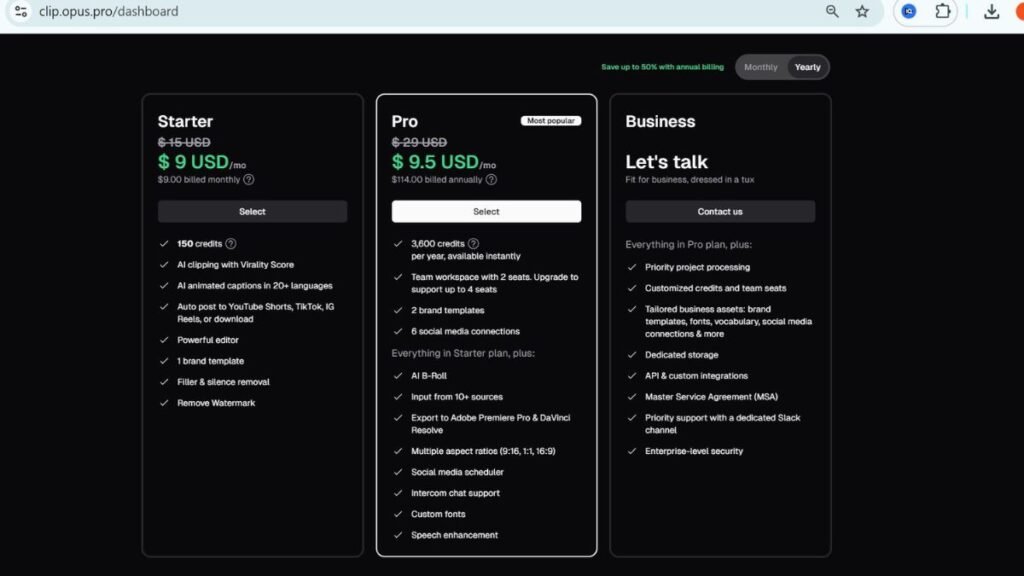
- Free Plan: 60 mins/month, HD (1080p), Watermarked.
- Pro Plan ($19/mo): Unlimited usage (fair use policy), No Watermark, AI Co-Pilot, and faster processing.
Our Recommendation: If you are a solopreneur or business owner, the $19/month fee pays for itself by saving you the cost of a freelance video editor.
Conclusion
Opus Clip is currently one of the strongest contenders in the AI video editing space. It effectively bridges the gap between long-form value and short-form virality. While the watermark on the free plan is a drawback, the quality of the AI curation makes the tool worth trying.
Whether you use the temp mail strategy to test it out or invest in the Pro plan, Opus Clip is an essential tool for anyone serious about growing on social media in 2025.